
If you are wondering whether to stick with Windows 11 or prepare for Windows 12, you are not alone. With rumors, leaks, and early previews shaping expectations, many users are trying to understand what really changes between the two versions and whether upgrading will be worth it.
This detailed Windows 12 vs Windows 11 guide breaks down everything in simple terms. From performance and design to AI features and system requirements, you will get a clear picture of what to expect and which version suits your needs.
Overview: Windows 11 vs Windows 12
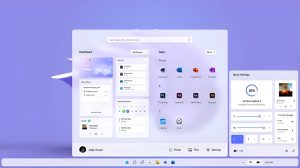
Windows 11 brought a modern design, improved productivity tools, and better gaming performance compared to Windows 10. It focused on a cleaner interface, centered taskbar, and deeper integration with Microsoft services.
Windows 12, on the other hand, is expected to take a major leap forward. Early reports suggest that Microsoft is focusing heavily on AI integration, modular updates, and improved performance across devices.
In short:
- Windows 11 is a refined and stable operating system for everyday users
- Windows 12 is expected to be smarter, faster, and more AI-driven
User Interface and Design Changes
Windows 11 Design
Windows 11 introduced a fresh look with:
- Centered Start Menu and taskbar
- Rounded corners and smooth animations
- Snap layouts for multitasking
- Simplified settings panel
It feels clean and modern compared to older versions, but after using it for a while, many users find it similar in structure to Windows 10.
Windows 12 Expected Design
Windows 12 is rumored to bring a more dynamic and adaptive interface:
- Floating taskbar and widgets
- Customizable layouts based on usage
- Smarter notifications powered by AI
- Improved touch and tablet mode
The design may also change depending on your device type, making it more flexible for laptops, tablets, and desktops.
Performance and Speed
Windows 11 Performance
Windows 11 improved performance in areas like:
- Faster wake from sleep
- Better memory management
- Improved SSD optimization
- Enhanced gaming performance with DirectStorage
For most users, Windows 11 runs smoothly on supported hardware.
Windows 12 Performance Improvements
Windows 12 is expected to focus heavily on efficiency:
- Faster boot times
- Better CPU and GPU optimization
- AI-assisted resource management
- Reduced background processes
This could result in noticeably faster performance, especially on newer hardware.
AI Integration: The Biggest Upgrade
Windows 11 AI Features
Windows 11 includes some AI-based tools like:
- Windows Copilot
- Voice typing improvements
- Smart suggestions in apps
However, AI is still limited and not deeply integrated across the system.
Windows 12 AI Capabilities
Windows 12 is expected to be built around AI:
- Deep integration of AI assistants across the OS
- Real-time task automation
- Smart file organization
- AI-powered search and recommendations
- Context-aware system adjustments
This means your computer could adapt to how you work, making everyday tasks faster and easier.
Gaming Experience
Windows 11 Gaming
Windows 11 is already a strong choice for gamers:
- Auto HDR for better visuals
- DirectStorage for faster loading
- Xbox Game Pass integration
Windows 12 Gaming Enhancements
Windows 12 may take gaming further with:
- AI-enhanced graphics optimization
- Better frame rate stability
- Lower latency
- Improved cloud gaming support
Gamers using high-end systems will likely see the biggest benefits.
Security and Privacy
Windows 11 Security
Windows 11 introduced stricter requirements:
- TPM 2.0 support
- Secure Boot
- Hardware-based isolation
This made it more secure but limited compatibility with older devices.
Windows 12 Security Improvements
Windows 12 is expected to enhance security further:
- AI-driven threat detection
- Advanced encryption methods
- Real-time security monitoring
- Stronger protection against malware and ransomware
Security will likely be smarter and more proactive.
System Requirements
Windows 11 Requirements
- 64-bit processor
- 4 GB RAM minimum
- 64 GB storage
- TPM 2.0 required
These requirements already excluded many older PCs.
Windows 12 Expected Requirements
While not officially confirmed, Windows 12 may require:
- Newer generation processors
- Higher RAM (8 GB recommended or more)
- AI-capable hardware (NPU support)
- SSD storage
This means older systems may struggle to run Windows 12 efficiently.
Software Compatibility
Windows 11 Compatibility
Windows 11 supports most modern applications and maintains compatibility with many older programs.
Windows 12 Compatibility
Windows 12 is expected to:
- Support existing Windows apps
- Improve performance for modern software
- Optimize apps using AI features
However, some legacy applications may not work as smoothly.
Updates and Support
Windows 11 Updates
Windows 11 receives regular updates with new features and security improvements. Microsoft plans to support it for several years.
Windows 12 Updates
Windows 12 may introduce a new update system:
- Faster updates
- Smaller update sizes
- Modular feature updates
This could reduce downtime and improve user experience.
Productivity Features
Windows 11 Productivity Tools
- Snap layouts and Snap groups
- Virtual desktops
- Microsoft Teams integration
- Focus sessions
These tools help improve workflow but are still fairly basic.
Windows 12 Productivity Improvements
- AI-assisted multitasking
- Automated workflows
- Smart scheduling
- Personalized workspace suggestions
Windows 12 could become a powerful tool for professionals and creators.
Should You Upgrade to Windows 12?
The decision depends on your needs and hardware.
Stick with Windows 11 if:
- Your PC works perfectly fine
- You do not need advanced AI features
- Your hardware is older
Upgrade to Windows 12 if:
- You want the latest technology
- You use AI tools frequently
- You have modern hardware
- You want better performance and automation
Pros and Cons
Windows 11 Pros
- Stable and reliable
- Clean user interface
- Good performance for most users
- Strong gaming support
Windows 11 Cons
- Limited AI features
- Strict hardware requirements
- Minor innovation compared to expectations
Windows 12 Pros
- Advanced AI integration
- Faster and smarter performance
- Improved productivity tools
- Better security
Windows 12 Cons
- May require new hardware
- Not fully available yet
- Possible early bugs after release
Final Verdict: Windows 11 vs Windows 12
Windows 11 is a solid and dependable operating system that works well for everyday use, gaming, and productivity. It is stable and widely supported, making it a safe choice for most users.
Windows 12 is shaping up to be a major upgrade focused on AI, speed, and smarter computing. If the expected features become reality, it could redefine how people interact with their computers. You can check out more details or download the latest Windows 12 ISO from here.
If you are planning for the future and have compatible hardware, Windows 12 will likely be worth the upgrade. But if you prefer stability and reliability right now, Windows 11 is still an excellent choice.
Conclusion
Choosing between Windows 11 and Windows 12 comes down to your priorities. Windows 11 offers a polished and reliable experience, while Windows 12 promises innovation and intelligent features.
As technology continues to evolve, Windows 12 could mark the beginning of a more automated and AI-driven computing era. For now, keeping an eye on official announcements and updates is the best approach before making a final decision.