
Artificial intelligence is no longer a futuristic concept, it is becoming a core part of the software we use every day. Microsoft envisions a Windows ecosystem where AI is deeply embedded, helping users work smarter and faster. From automating routine tasks to offering intelligent suggestions, AI is transforming Windows into a proactive assistant rather than just an operating system. Features like Microsoft Copilot, AI-powered apps, and smart automation are gradually reshaping the user experience, making computing more intuitive, efficient, and personal. This shift reflects a broader trend in technology where intelligence is integrated directly into the platforms people rely on most. Windows is positioning itself at the forefront of this AI revolution, offering tools that not only save time but also enhance creativity and productivity.
Why Artificial Intelligence Is Becoming Central to Windows
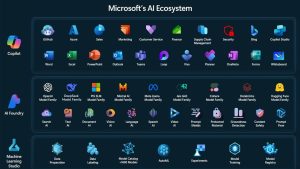
Traditional operating systems focused primarily on managing files, running applications, and connecting users to the web. Today, user expectations have evolved. People want systems that anticipate their needs, automate repetitive tasks, and personalize the computing experience. Microsoft recognizes this shift and has made AI a central pillar of Windows development. By combining machine learning, natural language understanding, and predictive analytics, Windows can now learn user habits, optimize performance, and deliver suggestions that matter most. The integration of AI also extends to cloud services, ensuring seamless intelligence across devices. Microsoft’s long-term strategy positions AI as a bridge between software, cloud, and hardware, creating an ecosystem where Windows users can enjoy smarter workflows and more meaningful interactions with their devices.
Microsoft Copilot: The AI Assistant Built Into Windows
Windows Copilot is Microsoft’s flagship AI assistant, embedded directly into the operating system to simplify daily tasks. Acting as a central hub, Copilot provides intelligent recommendations, automates routine processes, and allows users to control system settings using natural language. It integrates with Microsoft Edge to suggest relevant web content, with Office apps to help draft documents or analyze data, and with Teams to streamline communication. For example, a user can ask Copilot to summarize an email thread, schedule meetings, or even optimize system performance without leaving their workflow. The assistant continually learns from user interactions, making it increasingly personalized over time. By connecting different applications and services, Copilot transforms Windows from a traditional operating system into an intelligent environment that supports productivity, creativity, and efficiency at every step.
AI Powered Features Already Available in Windows 11
Windows 11 is already home to several AI-driven features designed to enhance productivity and accessibility. AI-powered search helps users find files and apps faster, understanding intent beyond simple keywords. Live captions and voice typing improve communication and accessibility for users with different needs. Creative tools like AI-powered image generation in Paint’s Cocreator assist in visual projects, while Windows Studio Effects leverage AI to improve video calls with background blur, auto framing, and voice enhancement. These features are not just convenient—they save time, reduce repetitive tasks, and make technology more approachable. By embedding intelligence directly into these functions, Microsoft ensures that users experience AI in ways that feel natural, seamless, and immediately useful.
AI Inside Microsoft Apps Across the Windows Ecosystem
Microsoft is extending AI beyond the operating system itself, embedding it throughout its suite of applications. In Microsoft Edge, AI features help summarize web content and suggest insights while browsing. Office apps like Word, Excel, and PowerPoint utilize AI to automate formatting, analyze data trends, and generate drafts. Teams meetings gain from AI-driven transcription, meeting highlights, and background noise reduction. Even media tools such as Photos use AI for image recognition and enhancement. Windows serves as the hub that connects these experiences, enabling users to switch effortlessly between apps while AI continues to assist in contextually relevant ways. This seamless integration ensures that AI is not a separate tool but a natural part of the digital workflow.
AI Powered Hardware: Copilot Plus PCs and NPUs
Modern Windows devices are increasingly designed with AI in mind, from specialized hardware to integrated processors. Neural Processing Units (NPUs) allow AI tasks to run directly on the device, reducing latency and improving efficiency. Microsoft’s Copilot Plus PCs leverage these advancements to deliver faster AI responses, smoother multitasking, and enhanced productivity. This hardware-software synergy means users can enjoy AI benefits without relying solely on cloud processing, improving both speed and privacy. By combining AI-ready hardware with Windows intelligence, Microsoft ensures that AI experiences are not only powerful but also reliable, even in demanding computing scenarios.
Security and Privacy in AI Powered Windows Systems
With AI becoming central to computing, Microsoft emphasizes security and privacy at every level. AI processing can occur locally on the device, reducing the need to send sensitive information to the cloud. Microsoft employs secure frameworks to encrypt data, manage permissions, and safeguard user interactions with AI tools. Users retain control over their data, choosing what to share and when. By integrating privacy protections directly into AI features, Microsoft addresses common concerns while allowing the technology to enhance productivity, creativity, and accessibility without compromising security.
How AI Will Transform the Future Windows Experience
Looking ahead, AI promises to redefine how people interact with Windows. Smart automation could manage tasks across multiple apps, while predictive computing anticipates user needs before they arise. Personalized user interfaces will adapt dynamically based on habits, preferences, and work patterns. System optimization driven by AI will ensure peak performance, energy efficiency, and minimal manual maintenance. Microsoft’s roadmap suggests that future versions of Windows will increasingly rely on intelligent algorithms to create an ecosystem that is responsive, adaptive, and deeply personal, making computing feel less like a tool and more like a collaborative assistant.
Benefits for Everyday Windows Users
AI integration in Windows directly benefits users by saving time, boosting creativity, and enhancing accessibility. Routine tasks like scheduling, file organization, and data analysis become automated. Creative projects are simplified with AI-powered image and document tools. Features like live captions and predictive typing make technology more inclusive. Even device performance improves, as AI dynamically optimizes resources. Whether for work, learning, or entertainment, AI ensures that Windows becomes more responsive, efficient, and helpful in day-to-day computing.
Frequently Asked Questions
What AI features are currently available in Windows 11?
Windows 11 includes AI-powered search, voice typing, live captions, AI image tools in Paint, and Studio Effects for video calls.
What is Microsoft Copilot in Windows?
Copilot is an AI assistant embedded in Windows, offering task automation, smart suggestions, and integration across Edge, Office, and Teams.
How do Copilot Plus PCs improve AI performance?
Copilot Plus PCs use Neural Processing Units to run AI tasks locally, providing faster, more responsive, and secure AI interactions.
Is AI in Windows safe and private?
Yes, Microsoft implements secure AI frameworks, local processing options, and privacy controls to protect user data.
Will future Windows versions rely more on AI?
Microsoft’s roadmap indicates that AI will become increasingly central, powering automation, personalization, and predictive computing.
Conclusion: The Beginning of an AI Powered Windows Era
Microsoft is transforming Windows into an intelligent ecosystem where AI enhances every aspect of computing. From Copilot to AI-powered apps and hardware, the operating system is evolving beyond a traditional platform into a smart assistant that supports productivity, creativity, and accessibility. As AI continues to integrate across devices, apps, and services, Windows users can expect a more intuitive, responsive, and personalized computing experience, signaling the start of a new era in technology.